Global & Subject Progress
Track your overall syllabus completion and dive into subject-specific progress to see exactly where you stand in your preparation.
The best free study planner for students. Build a daily study plan, create a weekly revision timetable, set subject goals, log sessions, and track streaks — all with cloud sync. Perfect for GCSE, A Level, SAT, GRE, GMAT, MCAT, CPA, and exam study plans for finals.
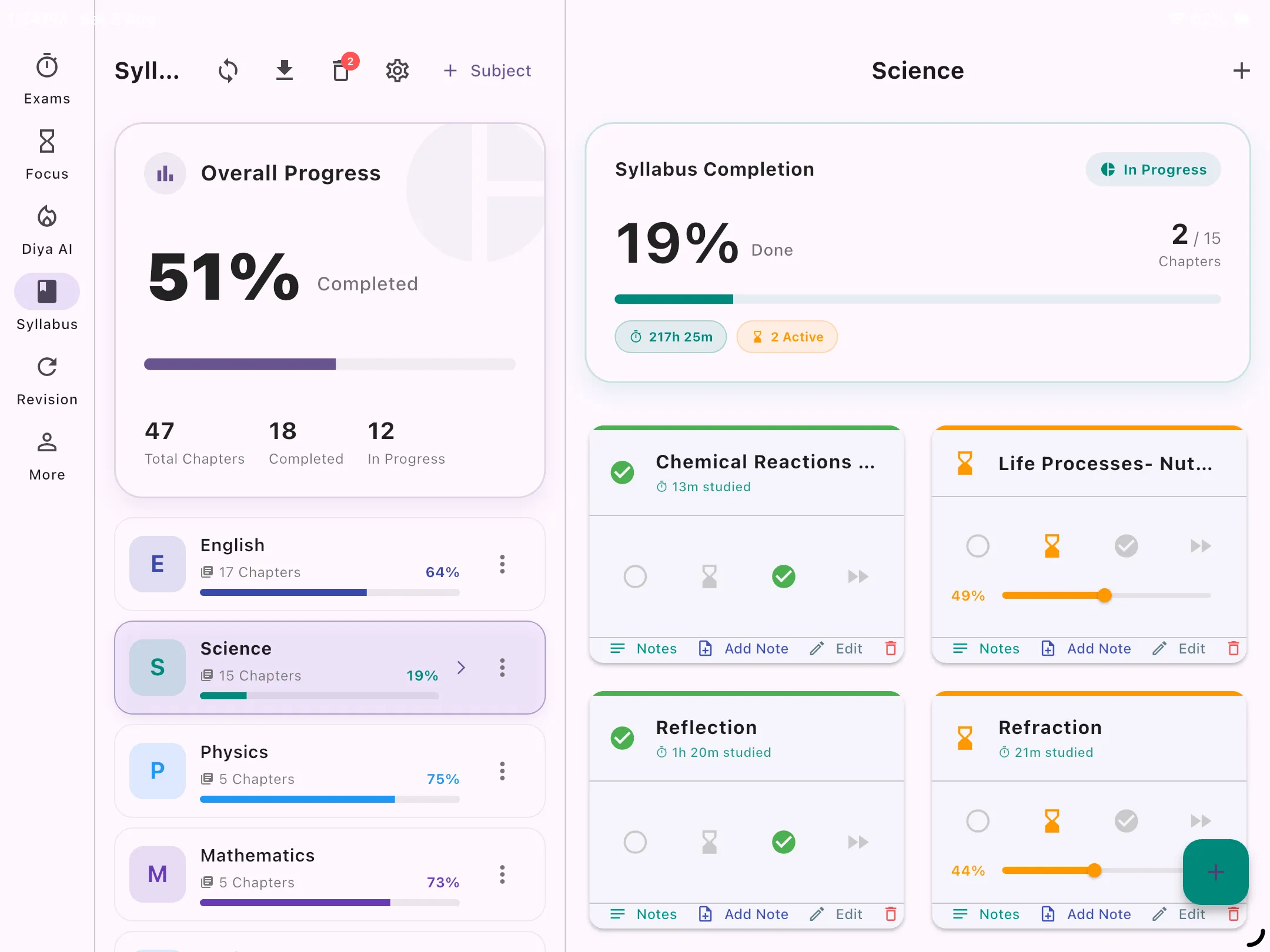
Tablet Preview: Comprehensive study planner dashboard with subject & syllabus tracking
A study planner is a structured schedule that helps you organize your study sessions by subject, time, and priority. Whether you need a daily study planner, a weekly study planner, or an everyday study planner that keeps you consistent, this app handles it all.
Students use it as a revision planner or revision timetable — mapping out exactly when to study each subject across the weeks before their exams. It functions as a blank revision timetable you fill in and adapt daily.
The app is ideal for GCSE study planner users, MCAT study planner prep, CPA exam study planner, GRE study planner, SAT study planner, GMAT study planner, and any student creating study plans for finals or big professional exams.
A complete study management system — your daily study planner, learning planner, and revision timetable in one free app.
Track your overall syllabus completion and dive into subject-specific progress to see exactly where you stand in your preparation.
Break massive subjects down into bite-sized chapters. Mark them as In Progress or Completed as you study to visualize your readiness.
Start the Pomodoro focus timer directly for a specific chapter, and automatically log the exact time spent studying that specific topic.
Add important formulas and study notes directly from the chapter tracking screen so they are always handy when reviewing.
Build daily study streaks that keep you consistent. Lose your streak? You'll be motivated to get right back on track — perfect for study plans for finals.
Schedule multiple revision passes for your exams and track your buffer time. Explore Revision Planner →
Whether you're cramming for finals or building a long-term revision timetable, this app adapts to your needs.
Build a GCSE revision timetable or A Level revision planner. Create a blank revision timetable, fill in your subjects, and track completion as you go.
Use it as a structured MCAT study planner or CPA exam study planner. Organize your prep by content area, set daily targets, and monitor your hours.
Perfect as a GRE study planner, SAT study planner, or GMAT study planner. Allocate daily time to Quant, Verbal, and Writing sections with goal tracking.
Create targeted study plans for finals. Map out every subject for the coming weeks and track daily progress to walk into each exam fully prepared.
Use it as a CIMA study planner or professional certification study planner. Manage multiple paper subjects, study sessions, and progress over months of preparation.
Meet Diya, our built-in AI study planner that generates personalized study schedules based on your exams, weak subjects, and available time. Learn more →
Research consistently shows that students who study regularly over weeks outperform those who cram the night before — even when total study hours are the same.
The Study Planner makes consistent studying easy by giving you a clear daily schedule, logging your progress, and showing you streaks and analytics that celebrate your hard work. It's the best study planner app for students who want to study smarter, not harder.
Read: How to Build a Study Schedule →Our dedicated Revision Planner lets you schedule multiple cycles, allocate target days, and automatically calculates your buffer time before the exam.
Explore Revision Planner →Yes! The app functions as both a daily study planner and a weekly study planner. You assign study sessions per subject each day, set weekly hour goals, and log your actual progress. It's one of the best everyday study planner apps, completely free.
Absolutely. Add your GCSE or A Level subjects, assign daily and weekly study targets, and track completion. The app works as a blank revision timetable you build yourself — or let Diya AI generate a personalized revision timetable for you.
Yes. The app is flexible enough to serve as an MCAT study planner, CPA exam study planner, GRE study planner, SAT study planner, or GMAT study planner. Add your subject sections, set daily targets, and track hours and progress.
After studying, open the app, select your subject, and tap "Log Session." Enter the duration — that's it. Your progress updates instantly across your daily and weekly study planner.
Yes. The app features cloud multi-device sync so your study plans are accessible everywhere.
Yes. The analytics section shows your study history by subject, week, and total hours — giving you a complete picture of your exam preparation.
The best free study planner app for students. Create your daily & weekly revision timetable now — it's completely free.
↓ Download Free