Upcoming Exam Widget
See your next immediate exam date and days remaining right from your home screen so you never lose track of urgency.
Check your exams, subject progress, and study streaks instantly with home screen widgets for Android & iOS. Plus, customize your study experience in the More Tab with digital ID cards, rich text notes, dark themes, drag-and-drop syllabus management, AI model settings, local backups, and support for 10 global languages.
Stay on top of your study schedule. Glanceable home screen widgets directly on Android and iOS.
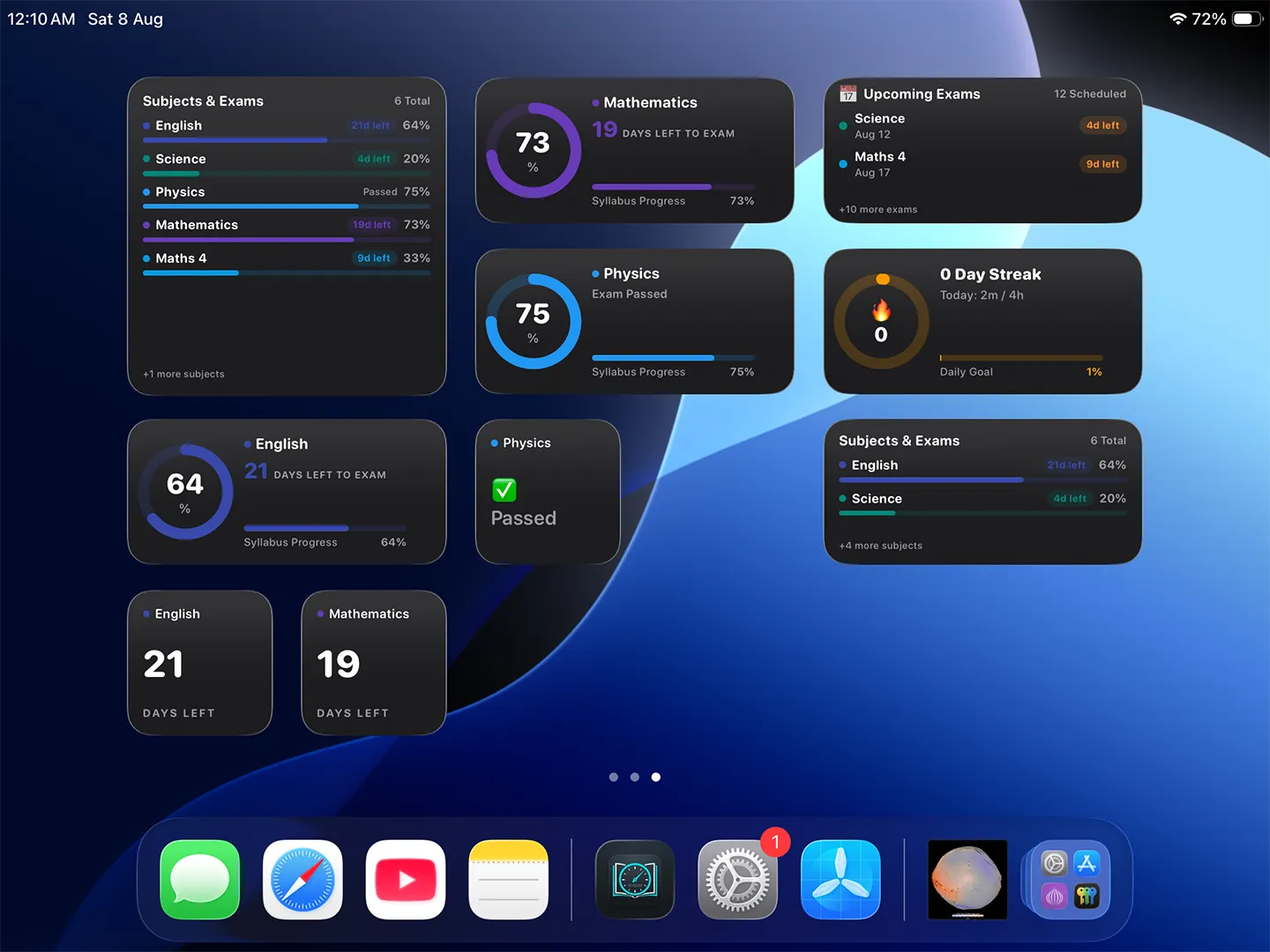
Home Screen Widgets for Android & iOS: Glanceable widgets for exam countdowns, subject progress, upcoming tests, and daily streaks
See your next immediate exam date and days remaining right from your home screen so you never lose track of urgency.
Monitor real-time chapter completion percentages across your subjects. Watch your completion bar fill up as you revise.
A continuous real-time countdown timer showing exact days, hours, and minutes until all major target tests.
Track your continuous daily study streak right on your home screen to stay motivated and maintain consistent study habits.
Fully optimized for Android and iOS native widget systems (note: widgets are available on mobile & tablet home screens, not on Windows desktop).
Check your key study stats instantly whenever you unlock your phone, keeping you aligned with your goals all day long.
The More Tab provides essential student utilities, personalized settings, privacy controls, and data protection.
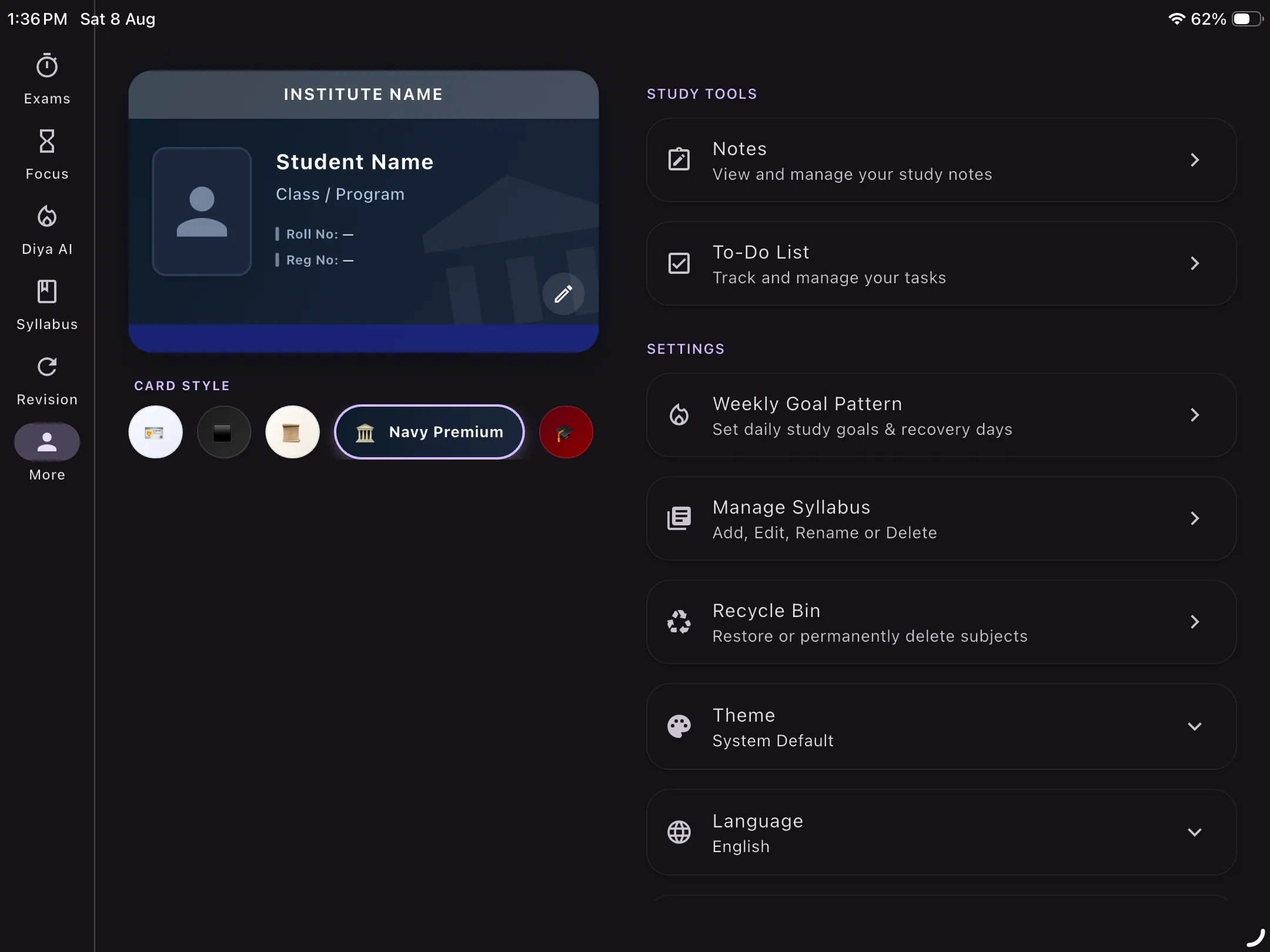
More Tab Overview: Complete central hub for student ID card, chapter notes, theme selection, syllabus reordering, and backup tools
A stylish digital ID card displaying key student details in a clean, elegant design for a quick look at your academic profile.
Take detailed study notes directly inside the app. Features a rich text editor organized chapter-by-chapter for clean revision.
Switch effortlessly between Dark mode (ideal for night study), Light mode, or automatically sync with your System Default theme.
Easily add, edit, rename, or delete subjects and chapters. Use smooth drag-and-drop reordering to prioritize your curriculum.
Accidentally deleted a subject or chapter? The Recycle Bin lets you easily restore deleted items with complete peace of mind.
Use the app in your native language! Supported languages: English, Hindi, Arabic, Spanish, Bengali, Portuguese, Indonesian, Vietnamese, French, and Turkish.
Select your preferred LLM model profile: Tutor for balanced everyday study, Professor for advanced topics, or Assistant for rapid task execution.
Enjoy complete privacy control with one-tap logout and straightforward options to permanently delete your stored user data.
Don't want cloud sync? Create instant local JSON backups of all your subjects, exams, and notes, and restore them anytime offline.
Direct access to your subject-linked task checklists and daily goals (detailed further on our To-Do List page).
Direct channel to reach out to the developer for support, submit feedback, report bugs, and learn more about LazyByte Labs.
Home screen widgets are currently supported on Android and iOS devices. You can place widgets for upcoming exams, subject progress, countdowns, and daily streaks directly on your phone or tablet home screen. On Windows, all stats are visible inside the main app dashboard.
The app supports 10 languages: English, Hindi, Arabic, Spanish, Bengali, Portuguese, Indonesian, Vietnamese, French, and Turkish. You can change your language anytime from the More tab settings.
If you prefer not to use cloud sync, you can tap "Export Data" in the More tab to download a complete JSON backup file of all your exams, subjects, chapters, to-do items, and notes to your local storage. You can tap "Import Data" anytime to restore this file.
In the AI Assistant settings, Tutor provides balanced, clear guidance for daily study; Professor offers deep, thorough explanations for complex academic subjects; and Assistant delivers rapid, concise answers for quick planning tasks.
Yes! Any deleted subject or chapter goes into the app's Recycle Bin. You can open the Recycle Bin from the More tab and restore your items with a single tap.
Download the free app for Android, iOS, or Windows today.
↓ Download Free